
Barclays Statement Analyzer — CSV/PDF/OFX (Free, Private)
Upload your Barclays bank statement to instantly categorize spending, spot subscriptions, and export a clean dataset for budgeting or taxes. Everything runs locally in your browser—no file ever leaves your device.
Upload & Analyze
Best results: Barclays CSV from Online Banking → “Export” → CSV · Date format: DD/MM/YYYY · Currency: GBP.
How to Export Barclays Statements (Web & App)
Barclays makes it straightforward to export your current account and credit card statements. For the cleanest results, export a CSV file from Online Banking on desktop. CSV carries column headers (Date, Description, Debit Amount, Credit Amount, Balance) that our analyzer reads automatically. Here is the quick process:
- Sign in to Barclays Online Banking and open the account you want to analyze.
- Select a date range. For trend analysis and recurring detection, we recommend the last 6–12 months.
- Choose Export and select CSV. Download the file to your device.
- Back on this page, click Choose file and upload the CSV, then press Analyze.
Prefer mobile? In the Barclays app you can export transactions to CSV from the account activity screens. If you only see PDF, that will work later with text-based parsing, but CSV gives the best accuracy today.
Why CSV Is Best for Barclays
CSV preserves each transaction as a row with clear debit and credit fields. Barclays separates amounts into Debit Amount (money out) and Credit Amount (money in). Our preset merges them into one signed Number: debits are negative; credits are positive. That means you can immediately see net cashflow, category totals, and merchant spend in pounds without manual editing.
What the Analyzer Detects Automatically
- Categories: We apply a rule-first categorizer for UK merchants (e.g., “TESCO” → Groceries; “TFL” → Transport). If a merchant is unknown, we infer it from words like “PAYMENT,” “AMAZON,” or “SUBSCRIPTION.” You can change categories in the table and re-export.
- Recurring payments: We scan for transactions with similar merchant names and amounts repeating every 28–31 days. Typical hits are streaming services, phone bills, and cloud subscriptions. The KPI shows a count; details are highlighted in the table via category “Recurring.”
- Merchant normalization: Barclays descriptions may include extra codes (e.g., “VISA PURCHASE 1234”). We trim common prefixes and normalize spacing so that “AMZNMktp” and “Amazon Marketplace” roll up together for clearer insights.
- Duplicates: If the same transaction appears twice within a 24-hour window with identical amount and description, we flag it. Many exports are clean, but this step prevents double-counting.
Preset Mapping for Barclays (The Important Bit)
To avoid manual mapping, the analyzer uses the following default for Barclays CSV:
| Incoming column | Mapped to | Notes |
|---|---|---|
| Date | Date | Parsed as DD/MM/YYYY. |
| Description | Description | Merchant normalization applies. |
| Debit Amount | Amount | Stored as negative. |
| Credit Amount | Amount | Stored as positive. |
| Balance | Balance (optional) | Not required for analysis. |
Have a Barclays credit card CSV? The headings are similar and will parse with the same preset. If the file uses a different naming convention, switch the preset to Generic CSV and choose the matching columns in the wizard (coming soon). For OFX/QFX, we parse standard banking tags and map to the same structure.
Insights You’ll Get
Once your file is processed, the dashboard surfaces the four key metrics UK customers ask for most: total transactions, net cashflow (credits minus debits), average monthly outflow, and the number of suspected recurring charges. Below those, both category and merchant tables show the biggest drivers of spend, so you can reduce leakage quickly—think dormant subscriptions, high delivery fees, or ride-hailing bursts on weekends.
For budgeting, export the cleaned CSV and import it into your favourite spreadsheet template or personal finance app. Because the data is normalized and categorized, you’ll avoid the usual CSV cleanup hours every month.
Barclays Quirks & How We Handle Them
- Date format: Barclays typically uses DD/MM/YYYY. We auto-detect and convert to an ISO date internally to prevent month/day swaps.
- Split debit/credit columns: Many UK banks split the sign across two columns. We merge them into a single signed amount.
- Merchant noise: Phrases like “VISA PURCHASE” or trailing store IDs are removed for cleaner grouping.
- Refunds & chargebacks: Positive amounts with terms like “REFUND” are categorized accordingly.
- Rounding: Amounts are normalized to two decimals; thousands separators are sanitized.
Privacy & Security
This tool is built privacy-first. Files are read by your browser’s FileReader API and processed in memory. No uploads, no server storage, and no tracking of the contents. Use the Clear button to drop all parsed data from memory immediately. For more on our approach, see our Privacy Policy.
Use Cases
- Budgeting: Build a realistic monthly plan by looking at the last six months of normalized spend.
- Tax prep: Export categorized CSV for business claims or self-assessment records.
- Expense reimbursement: Identify work-related charges by merchant and tag them quickly.
- Subscription control: See repeating merchants and amounts; cancel what you don’t need.
FAQs
Do you store my Barclays statement? No—everything runs in your browser.
Will PDFs work? Text-based PDFs will be supported; scanned PDFs require OCR. Export CSV for best accuracy today.
Can I edit categories? Yes. Click a category cell, type a new one, and the export will include your changes.
Which accounts are supported? Barclays current accounts and credit cards that export CSV/OFX/QFX.
What currencies? GBP by default. If your CSV has a currency column, we keep it; otherwise we assume GBP.
Is this financial advice? No. This is an informational tool—always verify important decisions with a professional.
Changelog
- v1.0 — Initial release: Barclays CSV preset, categories, recurring detection, export.
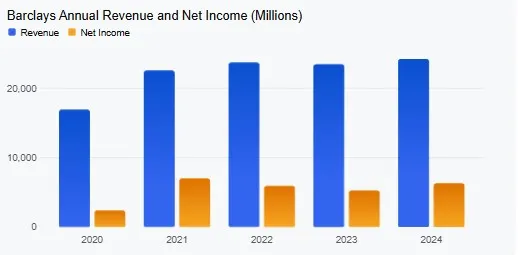
Barclays stock (BARC) is trading at 430.4 GBX as of November 28, 2025. The latest annual revenue was 24,250 million and the latest net income was 6,307 million in 2024. In the latest quarter, net income was 1,712 million.
- Latest Financials: For the latest quarter, the company reported sales of 6,535 million, with net income at 1,712 million.
- Share Performance: Recent analysis of Barclays’ share price suggests that it has been on the rise, though analysts are split on whether its recent gains present an opportunity or a risk.
- Analyst Upgrade: Recently, Barclays upgraded Sika AG’s stock to “Equalweight,” and its price target was raised, which may reflect positively on Barclays’ overall perception in the market.
- Quarterly Performance: Despite some single-off charges impacting profits, Barclays announced a $670 million buyback in the third quarter of 2025. The investment bank also saw an 8% year-on-year income growth, although its deal-related fees experienced a 2% decline.
- Business segments: Barclays operates a multi-brand credit card and consumer lending business known as Barclaycard, in addition to processing card payments for retailers and other businesses.








