
Fifth Third Statement Analyzer — CSV/PDF/OFX (Free, Private)
Upload your Fifth Third statement to auto-categorize spending, detect recurring charges, and export a clean CSV for budgeting or taxes. Everything runs in your browser—we do not upload or store your files.
* Scanned PDFs require OCR before parsing.
- Fast, private analysis (client-side only). Clean categories and recurring-payment detection.
- Use **CSV** for best results. OFX/QFX also supported. Text PDFs work if selectable.
- Download a standardized CSV/Excel and a quick summary for taxes or budgets.
- Unique to Fifth Third: column mapping for Date/Description/Amount or separate Debit/Credit, US date formats, and common merchant patterns.
Fifth Third Statement Analyzer
- Date: Transaction Date or Posting Date (format: MM/DD/YYYY)
- Description: Description or Transaction Description
- Amount: Amount (signed) — OR separate Debit/Credit
- Balance: optional
We process files in your browser. Nothing is uploaded or stored.
Format: category:keyword1,keyword2 (matches description; case-insensitive). First match wins.
What this tool does (and why it’s built for Fifth Third)
Bank statements look simple—until you try to answer practical questions like “How much did I really spend on restaurants?” or “Which subscriptions are quietly renewing every month?” The Fifth Third Statement Analyzer is designed to turn raw exports into answers you can act on. It ingests Fifth Third CSV files (best accuracy), OFX/QFX downloads, and most text-based PDFs. The parser standardizes dates and amounts, merges debit/credit columns when necessary, assigns plain-English categories using editable keyword rules, and flags merchants that behave like recurring subscriptions. You receive a clean, consistent CSV you can keep for budgets, taxes, or reimbursements, plus quick totals that highlight where your money goes.
Everything happens locally in your browser. No uploads. No sign-ups. If you close the tab, your data disappears. That privacy-first approach fits MoneyToolsHQ’s goal: helpful finance tools that are fast, transparent, and respectful of your data.
How to export Fifth Third statements (web & mobile)
Web (recommended: CSV)
- Sign in to your Fifth Third online banking and open the account you want to analyze.
- Look for an option like Download, Export, or Export Transactions.
- Select a date range (last 3, 6, or 12 months are common) and choose CSV. If CSV isn’t available, pick OFX/QFX.
- Download the file to your computer. Then click Upload statement in the tool above and press Analyze.
Mobile app (CSV via email or file manager)
- Open the Fifth Third app, pick your account, and view recent activity.
- Use the account’s export/share menu to save transactions as CSV or share them to your email/files app.
- Transfer the file to your desktop (or keep it on your phone) and analyze using the tool on this page.
Tip: If you only have a PDF, ensure it’s text-based (you can select and copy text). If it’s a scan, run OCR first (Google Drive or your phone’s Files app usually supports OCR).
Preset mapping for Fifth Third (so your data lines up correctly)
Fifth Third exports commonly include Transaction Date, Posting Date, Description or Transaction Description, and an Amount column. Some views provide separate Debit and Credit fields. The analyzer recognizes either format. Dates are normalized to YYYY-MM-DD. Signed amounts are preserved; if you export with split debit/credit, debits become negative to keep math straightforward. Balance is optional and, when present, is displayed but not required for analysis.
- Date: Transaction Date (or Posting Date). Expected format: MM/DD/YYYY.
- Description: Description or Transaction Description.
- Amount (signed): Positive for inflows, negative for outflows.
- Alternate format: Debit/Credit separate columns (debit converted to negative).
- Balance: Optional. Helps you eyeball gaps and reconcile with your ledger.
What the analyzer detects automatically
Categories. Simple doesn’t have to mean crude. The default rules include common US merchant patterns for groceries, restaurants, transport, shopping, utilities, and subscriptions. You can edit these rules in-place (comma-separated keywords). The tool scans each transaction’s description and assigns the first matching category; unmatched items fall into “other,” so you can add new rules and re-analyze instantly.
Recurring charges. Subscription-style payments often occur every 28–33 days. The analyzer groups similar descriptions and surfaces merchants with multiple evenly spaced debits, giving you a tidy “possible recurring” list. It’s intentionally conservative to reduce false alarms.
Totals that matter. You’ll see counts, inflow/outflow, net cashflow, per-category totals, and a cleaned CSV download. That standardized CSV saves time when you move data into spreadsheets, budgeting apps, or a tax worksheet.
Fifth Third quirks we accommodate
- Two date fields: If you export both Transaction and Posting dates, we prioritize Transaction Date and keep Posting Date only if you include it in your CSV; most users don’t need both.
- Reversals and refunds: Refunds often appear as positive amounts with similar descriptors. The standardizer keeps sign and bundles them into the same category for a realistic net picture.
- Location codes in descriptions: Descriptions can include city/state snippets (e.g., STARBUCKS 1234 CINCINNATI OH). Keyword matching is case-insensitive and resilient to numbers.
Insights you’ll actually use
Most people want three things: where the money went, what’s recurring, and what can be trimmed. The category table quickly highlights high-impact buckets (restaurants/shopping). Recurring detection bubbles up subscriptions you may have forgotten. And with a standardized CSV, you can plug numbers into your monthly budget, your accountant’s worksheet, or a reimbursement form with less manual work.
Privacy & security (no file leaves your device)
We designed this page to be useful without requiring an account or uploading files to a server. The parser runs in your browser’s memory; when you refresh or close the tab, the data is gone. If you want to maintain a record, use the Download Clean CSV button and store the file wherever you keep budgets or tax documents. See our Privacy Policy for general site details.
Use cases
- Budgeting: Export the standardized CSV and pivot by category/month.
- Taxes: Separate business vs. personal charges, find recurring software fees, flag charitable donations.
- Reimbursements: Filter for work trips and export only transportation and lodging.
- Debt payoff: Identify discretionary categories to free extra cash for principal payments.
FAQs
Do you store my Fifth Third statement?
No. Parsing and analysis run locally in your browser. We don’t upload or retain your files.
Which export should I choose?
CSV gives the best results. OFX/QFX also work. PDFs must be text-based (not scanned) or OCR’d first.
Can I customize categories?
Yes. Edit the rules, click Analyze again, and the tool will re-classify instantly.
Does this replace my budgeting app?
It plays nicely with budgeting apps. Think of it as a “cleaner and normalizer”—export the cleaned CSV and import it wherever you like.
Is the analyzer only for Fifth Third?
This page is tuned for Fifth Third exports. We also offer versions for other US/UK banks—see the Spending Analyzer hub.
Changelog
v1.0 (2025-11-28): Initial release with CSV/OFX support, basic PDF text parser, editable rules, recurring detection, and downloadable standardized CSV.
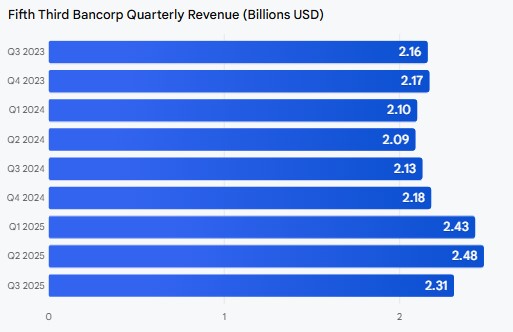
Fifth Third Bancorp (NASDAQ: FITB) is a financial services company with a trailing price-to-earnings (P/E) ratio of 12.93 as of November 28, 2025. The company’s recent Q3 2025 earnings reported an EPS of $0.91 and revenue of $2.31 billion.
Fifth Third Bancorp reported the following Quarterly Revenue from the last few years:
Fifth Third Bancorp Quarterly EPS00.20.40.60.8Q3 2023Q4 2023Q1 2024Q2 2024Q3 2024Q4 2024Q1 2025Q2 2025Q3 20250.920.990.70.860.780.90.710.880.91
Fifth Third Bancorp Quarterly Revenue (Billions USD)012Q3 2023Q4 2023Q1 2024Q2 2024Q3 2024Q4 2024Q1 2025Q2 2025Q3 20252.162.172.102.092.132.182.432.482.31
Additional information
- Stock price: As of November 26, 2025, the stock price was $43.33, with a 52-week range of $32.25 to $48.50.
- Analyst Outlook: The company’s recent earnings report highlighted a planned merger with Comerica, expected to expand Fifth Third’s market presence. Some analysts have a “Moderate Buy” rating, with an average price target of $50.35.








